

For construction workers, tradies, and contractors, the toolbelt isn’t the only thing that gets heavy. By the end of the financial year, glove boxes, dashboards, and wallets are often overflowing with faded paper receipts. From fuel stops and hardware runs to specialized safety gear, every single purchase represents a hard-earned dollar that could reduce your taxable income.
However, the construction industry moves fast. When you are rushing between suppliers and the job site, keeping track of tiny slips of paper is usually the last thing on your mind. Unfortunately, losing those receipts means leaving money on the table when tax season rolls around.
Optimizing your daily routine doesn’t require complex software or hours of data entry. Here are 7 practical, hassle-free ways construction workers can organize and log receipts on the go.
1. Go Digital Immediately with Mobile Scanning Apps
The absolute easiest way to ensure a receipt is never lost is to digitize it before it even touches your pocket. Thermal paper fades incredibly fast when exposed to the heat of a truck cabin or the humidity of a construction site.
- How it works: Use a dedicated mobile scanning app (like Adobe Scan, Microsoft Lens, or specialized expense trackers) right at the cash register.
- The benefit: These apps use Optical Character Recognition (OCR) to read the text, total amounts, and dates, turning a physical slip into a searchable digital PDF in seconds.
2. Leverage a Dedicated Business Bank Card
Mixing personal and business expenses is one of the most common traps for self-employed tradies. It creates a nightmare at tax time because you have to painstakingly cross-reference every single line item on your bank statement.
By dedicating one specific credit card or debit account solely to business expenses, you create an automatic digital ledger. Even if you lose a physical receipt, your bank statement provides a clear, chronological backup of where, when, and how much you spent. This practice also makes ongoing construction bookkeeping significantly more accurate and streamlined.
3. Set Up a Dedicated “Tax Receipts” Email Folder
Many modern suppliers, such as Bunnings, Reece, and local timber yards, now offer invoices and receipts via email or SMS. Instead of letting these digital receipts get buried among client enquiries and promotional emails, create a simple email filter.
Set up a folder called “Tax Receipts 2026” and move every digital invoice there as soon as you receive it. To make the process even easier, create an automatic rule that sends any email containing terms like “invoice,” “receipt,” or “tax invoice” directly to that folder.
4. Implement the “One In, One Out” Vehicle Storage System
If you still prefer or need to handle physical receipts while on the job, you need a system that prevents them from floating around the floor cabin.
The Vehicle Organizer Setup
Keep a small, durable plastic expanding file folder or a zippered pouch inside your glove box or central console. Divide it into basic categories:
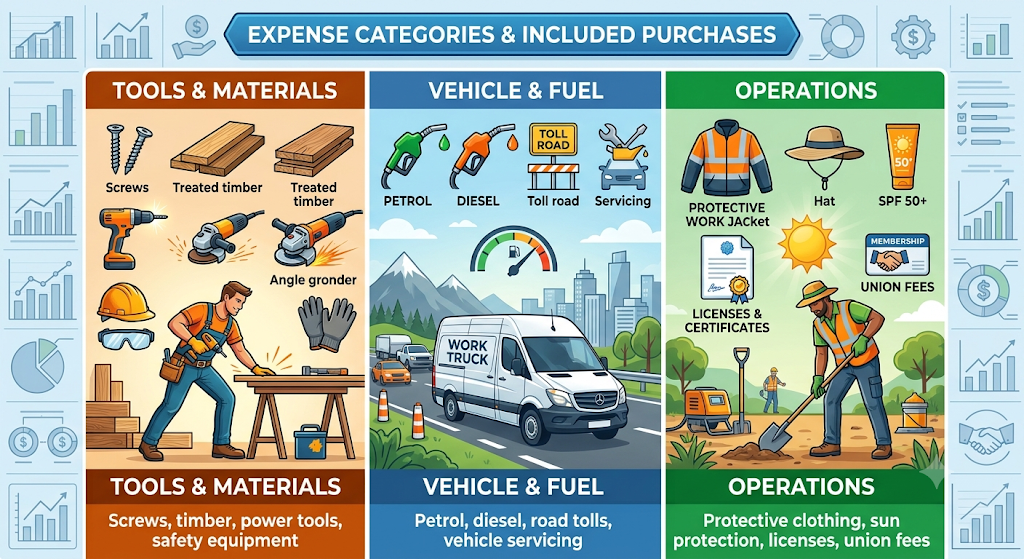
Every time you get back into your truck after a purchase, the receipt goes directly into the pouch, never on the dashboard.
5. Use Logbooks and Mileage Apps Synchronously
In construction, your vehicle is your mobile office. Claiming motor vehicle deductions is highly lucrative, but it requires strict record-keeping. If you are claiming deductions based on logbook methods, your receipts for fuel and repairs must align with your travel logs.
Using a GPS-based mileage tracking app allows you to log your trips in real time. Many of these apps let you attach fuel receipts directly to the specific trip you just completed, creating a foolproof audit trail.
6. Take Advantage of Cloud-Based Storage
Storing digital copies only on your phone leaves you vulnerable if your device gets damaged on-site or dropped in wet concrete. Link your scanning apps or email folders to a secure cloud storage drive (such as Google Drive, OneDrive, or Dropbox).
Create a simple folder structure by financial year and month. Because these services sync automatically, you can access your documents from your phone, tablet, or home computer at any time.
7. Establish a 5-Minute Weekly Routine
No system works without a little bit of consistency. The biggest mistake is waiting until June to review a year’s worth of expenses.
Set a recurring alarm on your phone for Friday afternoon or Sunday evening. Take just five minutes to:
- Empty any paper slips from your vehicle pouch.
- Scan them using your mobile app.
- Verify that your digital folders are up to date.
Devoting five minutes a week prevents the overwhelming stress of dealing with hundreds of loose papers at the end of the financial year.
Why Efficient Receipt Tracking Matters for Tradies
Managing these records efficiently does more than just help you maximize your tax deductions; it also gives you a clear understanding of your project margins. When you know exactly how much you’re spending on materials and overhead costs, you can price your jobs more accurately and profitably.
As your business grows and you begin employing apprentices or subcontractors, maintaining well-organized records also makes setting up compliant payroll services in Australia much easier. If managing the administrative side of your trade business is taking up too much of your time, it may be time to delegate the workload.
Working with professional accounting services can help ensure your business remains compliant with the latest Australian tax regulations, allowing you to focus on delivering quality work for your clients.
FAQ
No. The Australian Taxation Office (ATO) accepts digital copies of receipts as long as they are clear, legible, and show the supplier, amount, date, and nature of the goods. In fact, digital copies are preferred because thermal paper receipts fade over time.
If you lose a receipt, you can use alternative evidence such as bank statements, credit card records, or supplier log history to substantiate the claim. However, for items over a certain threshold or specific deduction categories, a valid tax invoice is highly recommended to avoid disputes during an audit.
You can only claim the work-related portion of the expense. If you buy a power tool that you use 80% of the time on job sites and 20% for weekend home renovations, you must apportion the cost and only claim 80% of the total price as a tax deduction.